Demo data
Purchase requests, created automatically
A request is entered once; endorsement, approval and the commitment of funds follow on their own.
Accounting software
For NATO Centres of Excellence, NATO military bodies, public entities and SMEs: we set up, configure and extend Manager around your rules, then keep it running with support and training. We also build tools for it: ready-made modules any business can add, and features crafted for your own procedures.
Try it yourself
Create your cloud server in minutes and work on your own books from any browser, with your whole team.
Start your free trial (opens manager.io in a new tab)
The trial is run by Manager; our link tells them we referred you, so that we can set it up for you when you are ready.
Or with us
We host Manager’s cloud edition for our clients on our own server, myerp.manager.cloud. Your businesses sit there under your own users, we administer the users for you, and you get unlimited users and unlimited businesses, with the people who set it up one call away.
1 year
You pay 80%of Manager’s price
2 years
You pay 65%of Manager’s price
3 years
You pay 50%of Manager’s price
Manager Advisor
Manager keeps an official directory of Advisors: the specialists it lists for businesses that want help to set up, configure and run its cloud edition. Business Plus Benefit is listed there for Greece, as well as in Manager’s directory of accountants.
“Advisors are specialists who focus on Manager.io implementation and support.”
The full demonstration
One film on demo data: sales and purchases, bank reconciliation, cost centres, IPSAS statements and reports, then our tools for budget execution, commitments, documents, certificates and the AI assistant.
 Demo data
This film is played by YouTube, which sets its own cookies.
To play films without this question, allow external media in the cookie settings.
Manager. Your accounting solution, innovative, flexible, and adjustable to your needs.
All editions carry the complete feature set. Nothing is installed, nothing is licensed separately, and the whole team works in the same books. Three editions exist, differing only in where the software runs, never in what it does. The cloud edition is the one proposed, and a move to your own server remains open at any time.
Where is the data? In Frankfurt, on the territory of a NATO member state and under European Union jurisdiction. Encrypted throughout, and exportable in full whenever you ask for it.
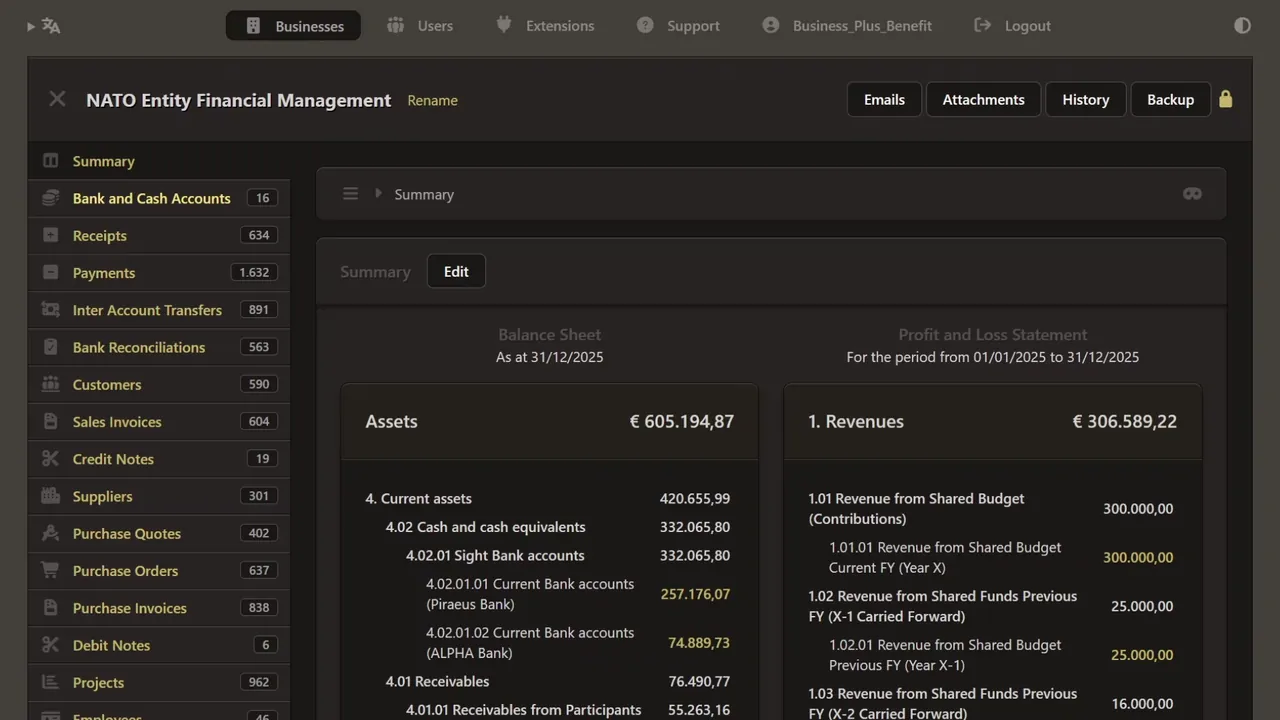
The accounting engine is mature. The configuration around it is entirely yours. This is the working environment. Bank and cash accounts, receipts and payments, transfers between accounts, and reconciliations. Then the counterparties: customers and their invoices, suppliers, purchase quotations, orders and invoices. Projects carry the activity dimension. Every screen you are seeing belongs to one business file, and every document posts to the same ledger.
The account tree is built to your framework, not to a vendor template.
Groups, control accounts and special accounts, arranged as the accounting policies of the institution require. On the revenue side, quotation, invoice and receipt form a single chain, each document carrying into the next.
On the expenditure side, the same principle applies, from the supplier record through to settlement.
Here the chain runs end to end. A quotation becomes a purchase order in three clicks. The order becomes an invoice. The invoice becomes a payment. Nothing is re-keyed at any stage. And at each step, the corresponding journal entry is created automatically, correctly coded, without anybody opening the general ledger. What you are watching is not the same information entered four times. It is one document travelling through four stages, with the accounting record produced as a by-product of the work itself.
From that same counterparty record, a private link can be issued, so the other side sees its own position without anybody preparing a statement.
The interface speaks the language of the user. Dutch, German, Greek: one setting, changed in a click, with nothing to configure. And from the same counterparty record, this is what the other side sees. Their invoices, what has been settled and what remains open, as it stands at this moment. Nothing beyond their own account is visible. Cash does not balance? That is where most time disappears, and where most is recovered. Here the balance does not agree. Rather than searching account by account, the system narrows the difference to the period, and to the entries where it began.
Cost per activity? Every transaction carries its cost centre as it is recorded. Revenue and expenditure for any task, project or activity are available without a second record being kept. And every figure opens: from the total, to the transactions behind it, to the document that created each one.
Assets on a spreadsheet? They belong in a register, tangible and intangible alike.
Each item carries its code, acquisition cost, useful life and depreciation. Photographs and supporting documents attach to the asset itself, so the evidence for recognition sits with the record.
Year end again? The primary statements are generated from the ledger, not assembled from the outputs of separate systems.
Standard, or your own? Beyond the catalogue, any report you need can be defined once, and run thereafter.
A wide catalogue is available, and custom reports can be built for requirements a template never anticipates. Here are the three primary statements under I P SAS: the statement of financial position, the statement of financial performance, and the cash flow statement. Each figure drills through to the transactions behind it, and from there to the document itself.
On pace, or behind? Because commitment data reaches the ledger, execution can be read continuously, against the pace the year requires.
Need another view? It can be read by status, by cost centre, by month, or against the same period a year earlier.
Thirteen views are available, and each answers a different question. Where the year stands at this moment. How execution compares with the pace required to finish it. Which cost centres are running ahead, and which are falling behind. How requests move through their stages, and where they accumulate. How the distribution has changed month by month. And how the current year compares with those before it, played through as a sequence. No single chart serves every user. A financial controller, a budget holder and a director each arrive with a different question, and each finds the view that answers it.
The indicator panel gives the position at a glance. Execution rate, approval rate, activity by chapter: the figures a controller is most often asked for without warning.
Only a few words? Drafting a justification consumes more time than any other part of the procedure, and produces the least consistent result.
Rather just ask? The same interface answers questions in plain language, from the institution's own records.
Asked how execution stands, and which cost centres are behind pace, the assistant returns the figures with the exception already identified. A few words in; a considered answer out. Another form to type? The invoice is read, and the certificate comes back completed. Recurring documents are the natural candidates for automation.
Year-end certificates? The annual withholding certificate needs no new data at all. It is assembled from the payments already recorded.
And the weekly report? Weekly, monthly, or any range you choose, produced with the same period a year earlier set alongside it.
The period is chosen. Nothing else is required. The report opens with budget execution, followed by the activity of the period: requests raised, decisions recorded, and what remains outstanding. It prints as it stands, ready to be signed or forwarded.
How long does one take? About a minute. Commitment accounting is where most arrangements break, because the ledger never receives the commitment. Here it does.
Who types all this? Nobody. Each document is assembled from the record, in the layout the paper procedure used, and remains editable by the officer responsible.
A few words are typed. One desk, one chair, the amounts, the date, and the reason. From that, a complete requisition form is drafted in the required register, ready to be reviewed, corrected where necessary, and submitted.
This is the form produced from those few words. What took a morning now takes a minute, and the officer still owns every sentence in it.
And the publication? The reference is located and attached to the record automatically, with nobody searching the public register by hand.
Is a password enough? Access is by named user, with a second factor at every sign-in, and every action is recorded against the person who took it.
Ready for the audit? The supporting documents sit on the transactions themselves. An auditor with read-only access reaches the same record and the same evidence, from their own location.
What you have seen is not a list of features. It is one environment, in which the commitment, the obligation, the payment, the asset and the statement all live in the same record. Everything demonstrated runs on the platform itself, and everything built on top of it runs inside it.
One platform. One ledger. One record. More than a hundred capabilities, extended without limit, and no additional system to procure, host or reconcile. A mature accounting engine, configured around your procedures, holding your ledger, and leaving your data entirely in your hands.
Business Plus Benefit designed this, built it, and delivers it. We would welcome the opportunity to do the same for you.
What we deliver
Our experience includes the configuration of a NATO Centre of Excellence accounting system on Manager, and teaching its customisation to financial staff of other NATO Centres of Excellence.
The cloud edition of Manager, provided and run by us for your organisation.
Tax codes, bank accounts, users and permissions, configured to your rules.
Mapped to your reporting framework, with fields for budget lines or funding sources.
Reports repeatable every period; invoices and orders in your own layout.
Workflows, dashboards and integrations crafted for you, running inside Manager.
Help when you need it, and training until your team is confident.
Manager hosting
We provide the cloud edition of Manager to our clients: set up for your organisation, kept up to date and supported by the people who configured it.
Your business set up and reachable from any browser, for every user you authorise.
Updates and backups handled by us, so your team simply works.
Your data stays yours: a full backup can be downloaded at any time.
Hosting, configuration, our tools and support from the same team.
Implementation
Five steps, each ending with something you can review before the next begins.
We review your rules, reports and data, and agree a written configuration plan.
Chart of accounts, custom fields, tax codes, users and document themes.
Opening balances and open items brought in and reconciled to your last closing.
Reports and any custom features built and tested on a copy of your business.
Your team takes over, with training and a guide written for your set-up.
Moving to IPSAS accrual at the same time? See IPSAS implementation.
After go-live
Choose the level of help that suits your team.
For a single question, a configuration change or a reconciliation that will not balance.
A standing arrangement for questions, changes and year-end closing, with response times agreed in advance.
A review of configuration, user access, controls and reports, with a short written list of findings.
Our tools
Ready-made modules any business can add, and features we craft around your own procedures. They run inside your Manager business as Custom Buttons, so your users need no extra software.
Commitments from request to journal entry, budget execution read against the pace of the year, analytical views and the AI assistant, each in a few seconds on demo data.
Request, endorsement, approval and journal entry in about a minute, without leaving the ledger.
A request is entered once; endorsement, approval and the commitment of funds follow on their own.
Every approved request produces its own form: numbered, filled in and ready to sign and file.
Drop in a supplier invoice: its details are read and the entries are prepared for you to approve.
Every online sale reaches your books without anyone typing it.
Drop in the bank statement and see at once what matches and what needs you.
Cash by bank account and month, inflows and outflows, and where the year will end.
Net sales by customer, item and month, read against your targets, with the year projected.
Spend by supplier and category, days payable and payments on time, from your own purchase records.
Document themes
Manager prints invoices, purchase orders and other documents through themes. We design yours around your letterhead, with legal details, references, bank details and a signature block in the same place on every document.
Fit check
We map your old accounts to the new chart, bring in opening balances and open items at a cut-off date, and reconcile them before go-live.
We redesign the box beyond any limit, with the tools we build.
Approval workflows, commitment control, request forms, integrations and analytics: what the software does not do on its own, we build into it, around your procedures.
FAQ
Both run the same software. We provide the cloud edition to our clients as part of our hosting, or set up the server edition on infrastructure you control.
You do. It sits in your own cloud account or server, you can download a full backup at any time, and we have only the access you grant.
Yes. Manager records invoices, payments and bank accounts in foreign currencies against your base currency.
No. Manager does not charge you based on how many users or businesses you add: 5 or 50, the price is the same. If you have many businesses, you can also specify which businesses are visible to which users. Great for accountants and bookkeepers with many clients.
With Manager’s own subscription, yes: there is no minimum contract, so you can cancel at any time without penalty or hassle. And unlike most online accounting software, you can download all your data and continue using the desktop edition for free. Our hosting plans are paid in advance for the 1, 2 or 3 years you choose: that is what makes their discount possible.
As a Manager Advisor, we may receive a commission from Manager for the subscriptions we support. It never changes what you pay: Manager’s own price, or less with one of our hosting plans.
Yes. In the cloud and server editions, administrators can limit each user to selected businesses and tabs. Approval steps can be added as a module we build.
Starting out, moving from spreadsheets or fixing a set-up that has drifted: we will tell you plainly what it takes.
We respond to RFP and RFQ invitations.
Accessibility
Accessibility statement