Business Plus Benefit
Book a callinfo@businessplusbenefit.com

Our tools

Tools we build for the accounting software “Manager”.

All screens show demo data.

Ready-made modules any business can add, and features we craft around your own procedures. They run inside your Manager business: purchase requests that commit funds on approval, invoices read straight into the ledger, online orders that arrive without retyping, and bank statements matched by drag and drop.

Screens of our tools for the accounting software Manager, with demo data:

The full demo

See our tools at work, from the first entry to the audit.

One film on demo data: the accounting software “Manager” and our tools for budget execution, commitments, documents, certificates and the AI assistant, as they run inside it.

Demo data
The accounting software “Manager” and our tools: the full demonstration, on demo data
Read the narration

Manager. Your accounting solution, innovative, flexible, and adjustable to your needs.

All editions carry the complete feature set. Nothing is installed, nothing is licensed separately, and the whole team works in the same books. Three editions exist, differing only in where the software runs, never in what it does. The cloud edition is the one proposed, and a move to your own server remains open at any time.

Where is the data? In Frankfurt, on the territory of a NATO member state and under European Union jurisdiction. Encrypted throughout, and exportable in full whenever you ask for it.

The accounting engine is mature. The configuration around it is entirely yours. This is the working environment. Bank and cash accounts, receipts and payments, transfers between accounts, and reconciliations. Then the counterparties: customers and their invoices, suppliers, purchase quotations, orders and invoices. Projects carry the activity dimension. Every screen you are seeing belongs to one business file, and every document posts to the same ledger.

The account tree is built to your framework, not to a vendor template.

Groups, control accounts and special accounts, arranged as the accounting policies of the institution require. On the revenue side, quotation, invoice and receipt form a single chain, each document carrying into the next.

On the expenditure side, the same principle applies, from the supplier record through to settlement.

Here the chain runs end to end. A quotation becomes a purchase order in three clicks. The order becomes an invoice. The invoice becomes a payment. Nothing is re-keyed at any stage. And at each step, the corresponding journal entry is created automatically, correctly coded, without anybody opening the general ledger. What you are watching is not the same information entered four times. It is one document travelling through four stages, with the accounting record produced as a by-product of the work itself.

From that same counterparty record, a private link can be issued, so the other side sees its own position without anybody preparing a statement.

The interface speaks the language of the user. Dutch, German, Greek: one setting, changed in a click, with nothing to configure. And from the same counterparty record, this is what the other side sees. Their invoices, what has been settled and what remains open, as it stands at this moment. Nothing beyond their own account is visible. Cash does not balance? That is where most time disappears, and where most is recovered. Here the balance does not agree. Rather than searching account by account, the system narrows the difference to the period, and to the entries where it began.

Cost per activity? Every transaction carries its cost centre as it is recorded. Revenue and expenditure for any task, project or activity are available without a second record being kept. And every figure opens: from the total, to the transactions behind it, to the document that created each one.

Assets on a spreadsheet? They belong in a register, tangible and intangible alike.

Each item carries its code, acquisition cost, useful life and depreciation. Photographs and supporting documents attach to the asset itself, so the evidence for recognition sits with the record.

Year end again? The primary statements are generated from the ledger, not assembled from the outputs of separate systems.

Standard, or your own? Beyond the catalogue, any report you need can be defined once, and run thereafter.

A wide catalogue is available, and custom reports can be built for requirements a template never anticipates. Here are the three primary statements under I P SAS: the statement of financial position, the statement of financial performance, and the cash flow statement. Each figure drills through to the transactions behind it, and from there to the document itself.

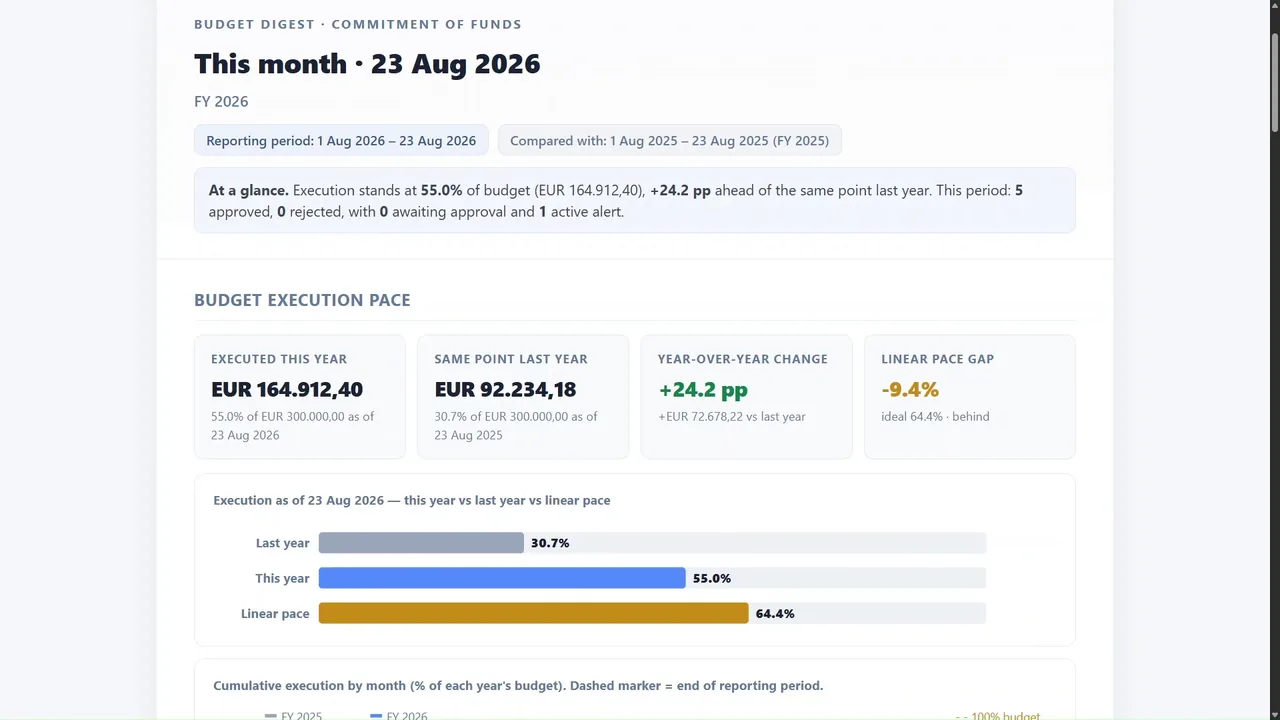
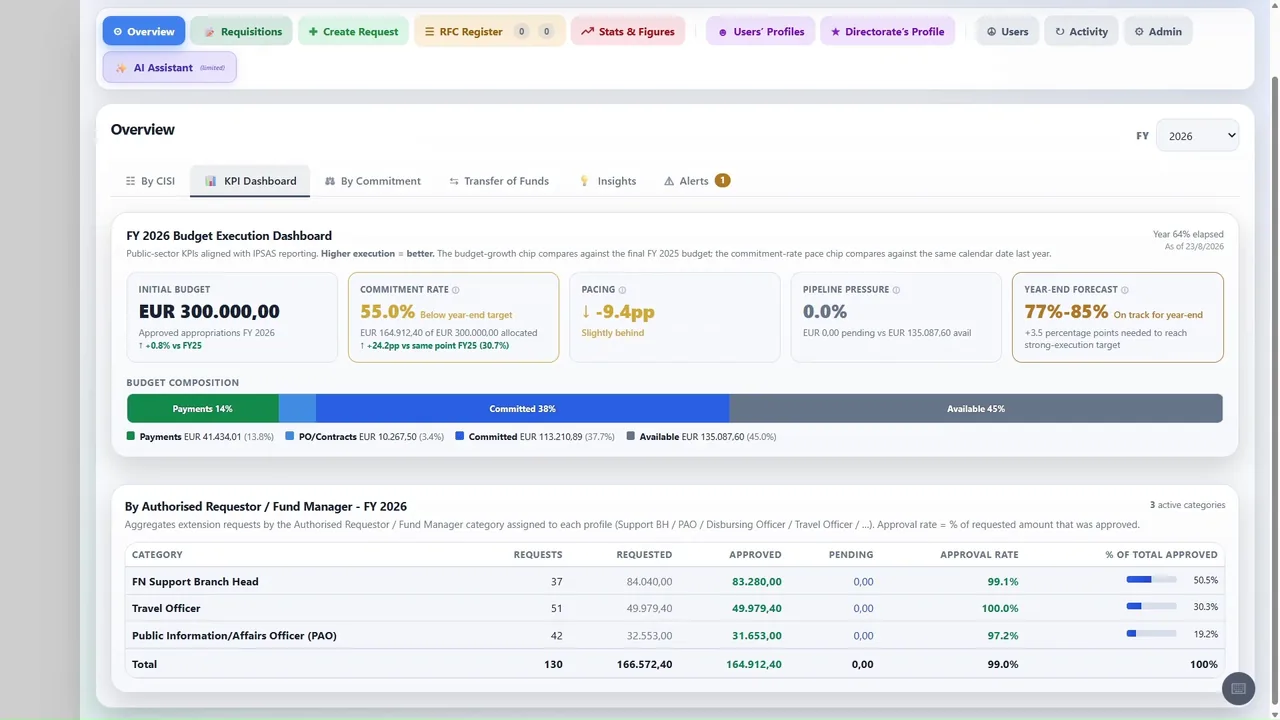
On pace, or behind? Because commitment data reaches the ledger, execution can be read continuously, against the pace the year requires.

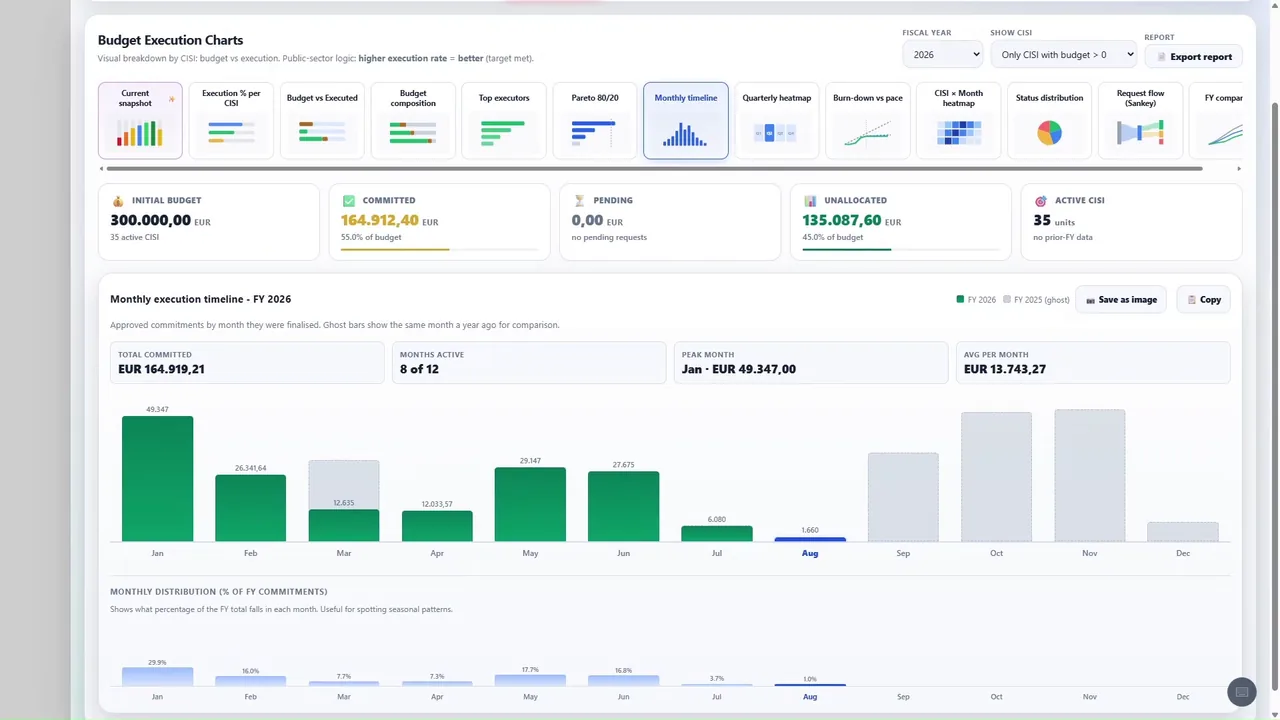
Need another view? It can be read by status, by cost centre, by month, or against the same period a year earlier.

Thirteen views are available, and each answers a different question. Where the year stands at this moment. How execution compares with the pace required to finish it. Which cost centres are running ahead, and which are falling behind. How requests move through their stages, and where they accumulate. How the distribution has changed month by month. And how the current year compares with those before it, played through as a sequence. No single chart serves every user. A financial controller, a budget holder and a director each arrive with a different question, and each finds the view that answers it.

The indicator panel gives the position at a glance. Execution rate, approval rate, activity by chapter: the figures a controller is most often asked for without warning.

Only a few words? Drafting a justification consumes more time than any other part of the procedure, and produces the least consistent result.

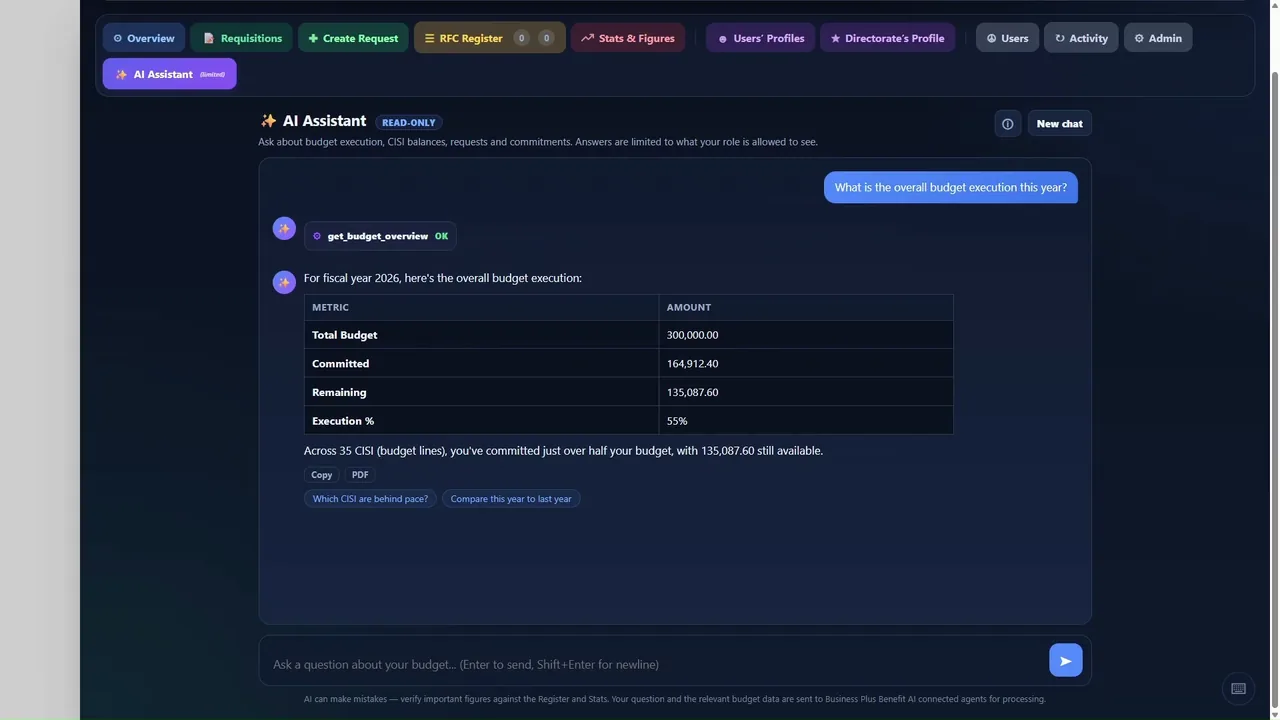
Rather just ask? The same interface answers questions in plain language, from the institution's own records.

Asked how execution stands, and which cost centres are behind pace, the assistant returns the figures with the exception already identified. A few words in; a considered answer out. Another form to type? The invoice is read, and the certificate comes back completed. Recurring documents are the natural candidates for automation.

Year-end certificates? The annual withholding certificate needs no new data at all. It is assembled from the payments already recorded.

And the weekly report? Weekly, monthly, or any range you choose, produced with the same period a year earlier set alongside it.

The period is chosen. Nothing else is required. The report opens with budget execution, followed by the activity of the period: requests raised, decisions recorded, and what remains outstanding. It prints as it stands, ready to be signed or forwarded.

How long does one take? About a minute. Commitment accounting is where most arrangements break, because the ledger never receives the commitment. Here it does.

Who types all this? Nobody. Each document is assembled from the record, in the layout the paper procedure used, and remains editable by the officer responsible.

A few words are typed. One desk, one chair, the amounts, the date, and the reason. From that, a complete requisition form is drafted in the required register, ready to be reviewed, corrected where necessary, and submitted.

This is the form produced from those few words. What took a morning now takes a minute, and the officer still owns every sentence in it.

And the publication? The reference is located and attached to the record automatically, with nobody searching the public register by hand.

Is a password enough? Access is by named user, with a second factor at every sign-in, and every action is recorded against the person who took it.

Ready for the audit? The supporting documents sit on the transactions themselves. An auditor with read-only access reaches the same record and the same evidence, from their own location.

What you have seen is not a list of features. It is one environment, in which the commitment, the obligation, the payment, the asset and the statement all live in the same record. Everything demonstrated runs on the platform itself, and everything built on top of it runs inside it.

One platform. One ledger. One record. More than a hundred capabilities, extended without limit, and no additional system to procure, host or reconcile. A mature accounting engine, configured around your procedures, holding your ledger, and leaving your data entirely in your hands.

Business Plus Benefit designed this, built it, and delivers it. We would welcome the opportunity to do the same for you.
Demo data
Purchase requests, created automatically. Demo data.

01

Purchase requests, created automatically

A request is entered once; endorsement, approval and the commitment of funds follow on their own.

  • Guided request form with the budget line already checked
  • Routed for endorsement and approval, with alerts at each step
  • Approval posts the commitment journal entries automatically

How it works

  1. Staff fill in one short form
  2. The request is endorsed and approved in the system
  3. Manager records the commitment, no retyping
Demo dataRequest forms, generated automaticallyDemo purchase request 0118 for EUR 4,850.00, endorsed and approved, is turned into a numbered request form with every field filled in and signature blocks for the financial controller and the authorising officer.Purchase requestDEMO-PR-0118Budget lineTraining & travelAmount4,850.00SupplierDemo Training LtdRequestedEndorsedApprovedGenerateREQUEST FOR COMMITMENTof funds, Demo Centre of ExcellenceForm no.DEMO-RCF-0118Budget lineTraining & travelAmount, EUR4,850.00Funds available9,950.00PurposeEndorsedFinancial controllerApprovedAuthorising officerGenerated from the approved request
An approved request becomes its form. Demo data.

02

Request forms, generated automatically

Every approved request produces its own form: numbered, filled in and ready to sign and file.

  • Form number, budget line, amount and funds available taken from the request
  • Endorsement and approval blocks for each signatory
  • Printed or saved in your own layout, nothing retyped

How it works

  1. The request is approved in Manager
  2. Its form is generated in one click
  3. Signed and filed, with the request behind it
Demo dataInvoice reading, straight to the ledgerA demo supplier invoice for EUR 7,588.80 is read field by field and a balanced journal entry is prepared, ready to post.Demo Supplier LtdVAT EL000000000InvoiceINV-0177Date09 Apr 2026Net6,120.00VAT 24%1,468.80Total7,588.80ReadSupplierVAT numberDate, linesAmountsJournal entryDr Supplies6,120.00Dr VAT input1,468.80Cr Supplier7,588.80Ready to post
Supplier invoice to journal entry. Demo data.

03

Invoice reading, straight to the ledger

Drop in a supplier invoice: its details are read and the entries are prepared for you to approve.

  • Supplier, VAT number, date, lines and amounts read from the PDF or scan
  • Purchase invoice and journal entries prepared in Manager
  • You review and post; nothing is typed twice

How it works

  1. Drop the supplier invoice
  2. Its data is read and checked
  3. The entries wait for your approval
Demo dataeCommerce to accounting software, with no manual entriesDemo online order 1048 for EUR 186.00 is recorded in Manager as a matched customer, a sales invoice and a receipt, with no manual entries.Online shopOrder 104898.0088.00TotalEUR 186.00CustomerSales invoiceReceiptManagerLedger up to dateCustomerSales invoice186.00Receipt186.00Manual entries: 0
Online order to ledger. Demo data.

04

eCommerce to accounting software, with no manual entries

Every online sale reaches your books without anyone typing it.

  • Orders arrive as sales invoices, customers and items matched
  • Payments recorded as receipts in the right account
  • Tax and shipping lines mapped once, applied every time

How it works

  1. A customer orders on your shop
  2. The bridge creates the invoice and the receipt
  3. Your ledger is up to date, manual entries: 0
Demo dataBank reconciliation by drag and dropA demo bank statement file is dropped in, four of its five lines are matched to existing entries and one exception is left for review, with eleven of twelve monthly statements on file.Bank statementstatement_demo_2026-09.csvDrop the file hereStatement linesMatched 4 of 501 Sep1,240.0004 Sep386.5009 Sep2,150.0015 Sep915.0022 Sep74.20Statements receivedOct 2025MissingSep 2026
Statement file to matched lines. Demo data.

05

Bank reconciliation by drag and drop

Drop in the bank statement and see at once what matches and what needs you.

  • Drag the bank statement file onto the page
  • Lines matched to receipts and payments already in Manager
  • A 12-month strip shows which statements are in and which are missing

How it works

  1. Drop the statement file
  2. Transactions are imported and matched
  3. Only the exceptions wait for you
Demo dataBank and liquidity analyticsThree demo bank accounts holding EUR 448,000 are read on their clear dates into a twelve-month chart of the cash position, with monthly inflows and outflows, a projection to year end of EUR 518,000 and a minimum balance line.Bank accountsCleared balancesCurrent account286,400Operations101,600Deposit60,000Total, EUR448,000Cash positionEUR thousandsMinimum 380InOutCleared to dateJFMAMJJASOND518
Bank accounts to the cash position, month by month. Demo data.

06

Bank and liquidity analytics

Cash by bank account and month, inflows and outflows, and where the year will end.

  • Balances read on their bank clear dates, account by account
  • Monthly inflows and outflows, with a projection to year end
  • Charts you can enlarge, save as images or open as a statement

How it works

  1. Choose the bank accounts and the period
  2. The cleared figures are charted month by month
  3. Open any month to the statement behind it
Demo dataSales and revenue performanceDemo sales invoices of EUR 301,800, less credit notes of EUR 6,000 and with late fees of EUR 1,200, give net sales of EUR 297,000 to date. A twelve-month chart shows net sales month by month against a monthly target, with the year projected to EUR 422,000 against a target of EUR 420,000.Sales recordsInvoices and credit notesSales invoices301,800Credit notes(6,000)Late fees1,200Net sales, EUR297,000Revenue performanceEUR thousandsTo date297.0Projected422.0Target420.0ProjectedJFMAMJJASONDNet salesProjectedMonthly target
Sales records to net sales against target. Demo data.

07

Sales and revenue performance

Net sales by customer, item and month, read against your targets, with the year projected.

  • Invoices, credit notes and late fees netted, customer by customer
  • Receipts and days to collect beside every sale
  • Targets against actuals, month by month, with the year projected

How it works

  1. Choose the period, the customers or the items
  2. Net sales are charted against the target
  3. Open any month to the invoices behind it
Demo dataPurchase and KPI analysisDemo purchase records (214 invoices, 198 payments, 46 suppliers, EUR 186,400 of spend) are read into purchase KPIs: 28 days payable, 94 per cent paid on time and 61 per cent of spend with the top five suppliers, with spend by category and days payable falling month by month to below the target of 30 days.Purchase recordsInvoices and paymentsPurchase invoices214Payments made198Suppliers46Spend, EUR186,400Purchase KPIsYear to dateDays payable28Paid on time94%Top 5 share61%Spend by category, EUR thousandsIT services62.0Facilities48.5Travel31.2Office supplies22.7Other22.0Days payable, by monthTarget 30
Purchase records to purchase KPIs. Demo data.

08

Purchase and KPI analysis

Spend by supplier and category, days payable and payments on time, from your own purchase records.

  • Spend by supplier, category and month
  • Days payable and payments on time, supplier by supplier
  • From any KPI to the invoices and payments behind it

How it works

  1. Choose the period and the suppliers
  2. The KPIs are read from invoices and payments
  3. Open any figure to the records behind it

More of our tools

Analysis, answers and documents, from what you already have.

Demo data

Budget execution analytics

Budget, commitments and spending per line at a glance, one click from the entries behind them.

Demo data

AI assistant

Questions in plain language, answered with figures from your own ledger.

Demo data

Analytical views

Status, cost centres, request flow and year on year, all from the same records.

Need a workflow of your own? We craft custom features and modules around your procedures.Accounting software services

Delivery

How our tools are delivered.

Each tool is set up with your team around your own accounts and procedures.

  • Inside your Manager business

    Our tools run as Custom Buttons in your own Manager business, including the cloud edition we host for you, and work with the records already there.

  • No extra software for users

    Users open them from within Manager. There is nothing else to install on their computers.

  • Your data, explained first

    Before installation we set out how each tool handles your data, including any outside service it relies on, such as an optional AI provider.

  • Licensing and support

    Licensing and support terms are available on request. Training for the people who use the tools can be included.

Request a demo on demo data.

We walk you through our tools on a fictional business, then look at what would fit your own Manager set-up.

Start a conversation

Tell us about your box.

What you are working with, and where it pinches. We reply within 2 working days.

Fields marked * are required. We work with businesses and public bodies (B2B and B2G). We use your details only to reply to your enquiry. Cloudflare Turnstile checks that the form is sent by a person. See the privacy notice.

Cookie settings

Choose what this website may load.

Necessary

Three small values kept in your browser, never sent to us: your choice here, that the opening animation has played, and "Pause animations" if you use it. No cookies. When you use the contact form, Cloudflare Turnstile checks that a person is sending it.

Always on

External media: YouTube

The demo film plays in YouTube’s privacy-enhanced player, which sets cookies and similar storage of its own (Google). If you do not allow it here, nothing is loaded from YouTube until you press play and confirm.

More in our privacy notice.